
Pilvilampi365 MCP
Pilvilampi365 MCP is an open-standard solution for securely leveraging business data with AI. We connect AI directly to your company’s data, delivering precise answers to your questions even in seconds with top-tier data security.

The next level of personalized information management
Ask directly from your own data
Business-critical information often resides in SharePoint lists, but AI applications cannot access it even with M365 connectors. Pilvilampi365 MCP enables you to leverage SharePoint list data with the AI tool you are already familiar with. Ask Claude or ChatGPT in your own words, and the response will be retrieved from the data stored in your company’s SharePoint.
- Familiar: Operates on top of your existing Pilvilampi365 system and SharePoint lists, without migrations or new systems.
- Secure: The server is installed in your own Azure tenant, and every query is executed using the requester’s personal access rights.
- Controlled: Pilvilampi365 MCP acts as a proxy server, granting the AI application controlled and auditable access to your organization’s SharePoint data.
What is MCP
An Open Standard Connecting Your AI to Your Own Data
MCP, or Model Context Protocol, is an open interface standard for how an AI application and a data source communicate with each other. An AI model cannot access anything on its own nor does it remember anything—it only knows how to ask. The MCP server is the component that authenticates the user, restricts what they can access, and retrieves the information on their behalf.
Without it, AI just guesses
A general AI application knows nothing about your contracts, projects, or sales. Its response is at best well-meaning, generic text. Copying attached files into a chat is tedious. MCP opens a direct connection to your data—without copying or intermediate steps.
Finding information takes time
The information exists, but it is scattered across lists, documents, and reports. Compiling it means opening files, filtering, and running spreadsheets—and a new question to the AI restarts the exact same process. This creates a recurring, measurable waste of time.
An investment that doesn't lock you into a single vendor
Because MCP is an open standard, the same server serves multiple AI applications. When models and applications change, your own connection interface remains.
In your own environment
Claude or ChatGPT operates outside your M365 environment. With MCP, only the questions and answers cross that boundary—the server, logs, and encryption keys stay within your own Azure subscription.

Ask in your own words
You can use Claude or ChatGPT logged in with your own credentials. The functionality of both with MCP has been proven in practice. Ask one thing today, another tomorrow—in your own language, without pre-built views.

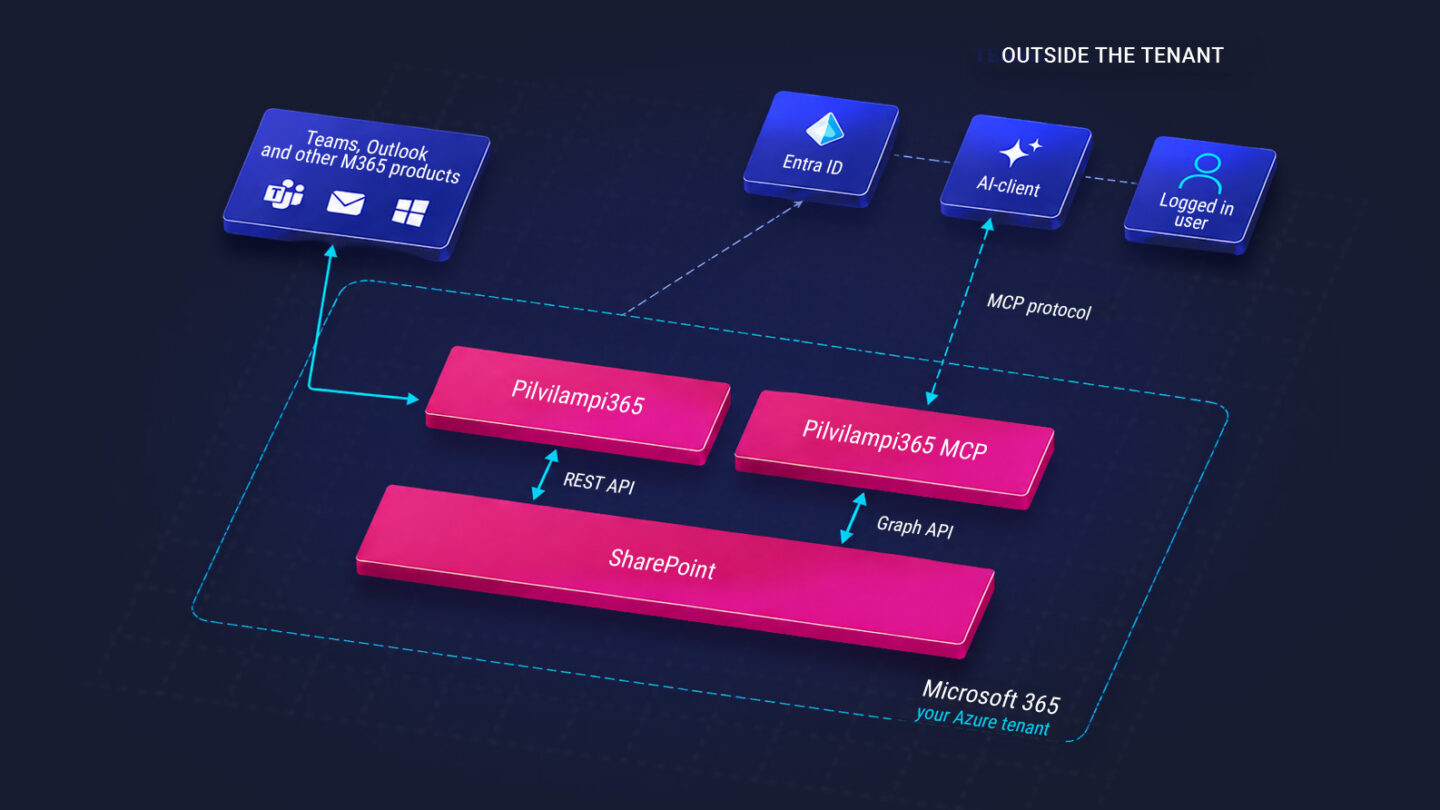
MCP protocol
Data flows from the AI application to the MCP server running in your own Azure subscription. Information is retrieved securely from SharePoint lists on your behalf using your authenticated access rights.

The server authenticates and restricts
Entra ID verifies the login, and the server retrieves the data via Microsoft Graph using the requester’s own permissions. Three levels of restriction must be cleared: Azure boundaries, allowed targets on the MCP server, and the user’s personal SharePoint permissions.

You only see what you allow
Only allowed sites and lists are within the scope of the solution, and the tools operate in read-only mode, so nothing is altered. Every query leaves a trace in your own audit log, and you can dive deeper with follow-up questions.
How it works in practice
Ask in your own words, get answers from your own data
No reporting tools, no Excel exports, no clicking from view to view. You ask in your own words, and the answer is compiled from the same SharePoint lists that power your business today. When an answer raises a follow-up question, you drill deeper right within the same chat.
Four open projects exceed the 80% threshold. Two of them are on schedule, one has an unapproved change request, and one is still logging hours under the design phase.
The change request concerns an scope extension to the original delivery. The project manager and the latest entry can be found on the project list: approval is pending the customer’s steering group meeting next week. Shall I prepare a status update for the steering group?
An answer or report, precisely about what you asked
Until now
Pre-built views
Reports and dashboards are designed in advance and serve well for routine monitoring. But when a new question arises, you are faced with a development request, waiting, and Excel or Power BI modifications—only for tomorrow’s question to be entirely different again.
With Pilvilampi MCP
The question can change every day
Today you ask about budgets, tomorrow about proposals, and the day after about something no one could have anticipated. You can also simply describe a situation, and the AI will infer on its own what information is needed to resolve it. Pre-built reports remain for routine tracking; one-off questions are handled through conversation.
Why this is different from other AI connectors
Your own tenant: The server, logs, and encryption keys reside in your own Azure subscription in the region of your choice. No content is stored in the solution’s or MCP’s own data repositories.
Three levels of restriction: Azure configuration, the application’s own restrictions on allowed targets, and the user’s personal SharePoint permissions. Any single layer is sufficient to prevent access.
Single-list restriction: An individual list or library can be excluded from the AI’s reach, even if the rest of the site is included.
Read-only, no modifications: The current tools operate in read-only mode, and the granted permissions do not include write access. The solution cannot alter or delete your data.
Auditable: Every query leaves a trace in your own audit log. Usage can be verified after the fact—the same security-first approach we use when building systems for our NIS2-regulated clients.
In use by us internally: We read our own customer, project, time-tracking, and contract data using the exact same server. The solution is proven in real daily work, not just tested.
We’d love to show you how chatting with your system works.

Deployment requires only three things
1. Your own Azure subscription
The server runs in your subscription, so Azure costs stay with you and depend on usage. If needed, you can obtain a subscription from us through the Arrow CSP channel.
2. Your own AI subscription
You choose the AI application and acquire its license. Claude and ChatGPT are proven to work in practice, and the same server will serve other MCP-compatible applications as well.
3. Selection of sites and lists
Together with us, you decide which SharePoint sites and lists are included. Restrictions are defined before deployment and can be modified later.

Are you taking full advantage of your data?
We'd love to show you how chatting with your system works. Don't hesitate to reach out or leave your contact details.